
Most SEO reports are long, full of charts, and skipped. The client opens the PDF, scrolls past twenty pages of graphs, and asks the only question that matters on the next call: “So, is this working?”
When a report can’t answer that in the first page, clients start to doubt the investment, even when the SEO work is going well. That’s how good accounts get cancelled.
This guide shows you which metrics actually prove the value of SEO in 2026, including visibility in AI answers, and how to put them on one page a busy client will read.
Quick answer: what should a monthly SEO report include?
A monthly SEO report should open with a one-paragraph summary and include eight core metrics: organic leads or revenue, organic conversion rate, non-branded clicks, impressions and visibility for priority topics, rankings for money keywords, AI answer visibility, technical health, and work completed. Close with next month’s priorities. Everything else belongs in an appendix.
Vanity metrics vs. business metrics: what’s actually different?
Not every number that goes up is good news for the client. The key is to connect SEO activity with outcomes the business cares about.
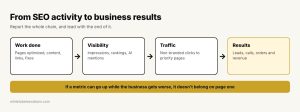
From SEO activity to business results
| Vanity metric | Why it misleads | Show this instead |
|---|---|---|
| Total keywords ranking | Includes thousands of irrelevant terms | Rankings for 20 to 50 money keywords |
| Total sessions | Includes branded and low-value traffic | Non-branded organic clicks and leads |
| Domain authority | A third-party score, not a Google metric | Quality links earned and referral traffic |
| Average position | Hides big wins and losses | Clicks and leads from priority pages |
The rule: if a metric can go up while the client’s business gets worse, it shouldn’t be on the first page.
The 8 SEO metrics that prove ROI
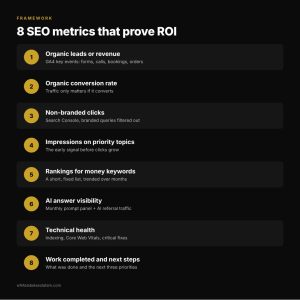
8 SEO metrics that prove ROI
1. Organic leads or revenue
This is the metric that keeps the account. For lead-generation businesses, track form fills, calls and bookings from organic search as key events in GA4. For e-commerce, track organic revenue and orders. If you can, add the value of a lead so the client sees dollars, not just counts.
2. Organic conversion rate
More traffic only matters if it converts. Track the conversion rate of organic visits over time. If traffic goes up but conversions don’t, the problem may be the landing pages, not the SEO.
3. Non-branded clicks
People searching for the brand name would probably find the client anyway. Clicks from non-branded searches (like “emergency plumber near me”) are what SEO actually adds. In Google Search Console, filter out branded queries to separate the two.
4. Impressions and visibility for priority topics
Impressions grow before clicks do. Rising impressions on priority topics show that pages are entering search results, which is early proof the strategy is working, especially in the first months.
5. Rankings for money keywords
Track a short, fixed list of keywords that drive business: the services, products and locations the client sells. Show movement over three to six months, not week by week.
6. AI answer visibility
Buyers now ask ChatGPT, Perplexity, Gemini and Google’s AI Mode for recommendations. Google folds AI Overviews and AI Mode traffic into Search Console’s standard Performance report rather than separating it, so you need your own tracking:
- Build a fixed list of 20 to 30 questions the client’s buyers ask.
- Check them on the same day each month in the main AI tools.
- Record whether the client is mentioned, cited with a link, or missing, and save a screenshot.
- Track referral traffic from AI tools (such as chatgpt.com or perplexity.ai) in GA4.
This is the metric clients ask about most in 2026, and the one most reports still leave out.
7. Technical health
Show a simple health check: pages indexed vs. submitted, Core Web Vitals status, crawl errors and any critical issues fixed. One line per item is enough. Clients don’t need the full crawl, just proof that the site is in good shape.
8. Work completed and next steps
List what was done this month (pages optimized, content published, links earned, fixes deployed) and what’s planned for next month. This is what shows the client their money is turning into work, especially in months where results are flat.
A one-page report structure
The best SEO reports fit the key story on one page, with details in an appendix for those who want them.
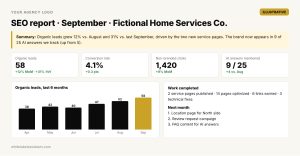
Illustrative example: a one-page SEO report
Illustrative mockup with fictional numbers. The story comes first: results, why they happened, what’s next.
- Summary: three sentences on what happened and why.
- Results: leads or revenue, conversion rate and non-branded clicks vs. last month and last year.
- Visibility: rankings for money keywords and AI answer visibility.
- Work completed: the month’s deliverables.
- Next month: the three priorities.
Compare against the same month last year whenever possible. Seasonality makes month-over-month comparisons misleading for many businesses. Search Console keeps 16 months of data, so export it regularly if you want longer history.
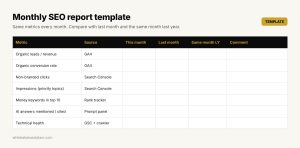
Monthly SEO report template
Common SEO reporting mistakes
- Leading with charts instead of a conclusion. Tell the client what happened, then show the proof.
- Reporting only rankings. Rankings don’t pay the bills; leads do.
- Hiding bad months. Explain what happened and what you’re doing about it. Clients forgive results, not surprises.
- Changing metrics every month. Use the same metrics so trends are visible.
- Ignoring AI search. If the client asks “Are we showing up in ChatGPT?” and the report has no answer, it looks out of date.
When it makes sense to get help
Good reporting takes time: setting up GA4 key events, building dashboards, running AI visibility checks and writing a clear summary for every client every month. Many agencies work with a white label SEO company that delivers the work and the branded monthly report, so the agency can walk into every client call with a clear story and no reporting backlog.
However you produce it, keep the goal in mind: a report that answers “Is this working?” on the first page.
FAQ
How often should I send SEO reports to clients?
Monthly works for most clients. Weekly reporting usually shows noise, not progress. Send quick updates between reports only for important wins or issues.
What tools do I need for SEO reporting?
Google Search Console and GA4 cover most of it. A rank tracker, a crawler and a dashboard tool like Looker Studio make it faster. AI visibility can be tracked with a manual monthly check or a dedicated tool.
How do I show SEO ROI when results are slow?
Show leading indicators: impressions, new pages indexed, rankings moving into the top 20, and work completed. Then connect them to the leads and revenue goals you agreed on at the start.
Can I track traffic from ChatGPT and other AI tools?
Partly. GA4 records visits that come from AI tools as referral traffic when the tool passes that information. Mentions without clicks need a manual check of your question list each month.
About the author
Juan José Giraldo is a senior SEO, GEO and AEO specialist based in Medellín, Colombia. He works on technical and local SEO for 600+ U.S. car dealerships, supervises SEO for 18 U.S. e-commerce stores, and runs White Label SEO LATAM, a nearshore white label SEO partner for marketing agencies.